| The Tips address Printer "recalcitrant" when printing Posted: 06 Jun 2011 02:37 AM PDT Free Software  For those of us who frequently printed documents or anything with a printer, sometimes having problems be naughty in his process of printing. When printing multiple documents, then the document first failed (error) is usually the printer stops printing, queue the data do not want to be removed and the computer must be restarted to start printing again. With a small and free program, Stalled Printer Repair, we can solve it easily.  The process of printing to a printer could be stalled due to various reasons, such as the data is corrupted when sent to the printer or process printing is not complete in the submit applications but can not be deleted. So that the next print queue list will not be able to run. This is usually known by the term Stalled/Stuck Print Job.  With Stalled Printer Repair, we could delete all the lists of the queues in the printer, and then repeat the process of printing without having to restart the computer. Some features of this application include: - Detects a Stalled Print Jobs
- Delete all list of queues that can not be in print.
- Applications are portable, do not need to be installed and do not write in the registry
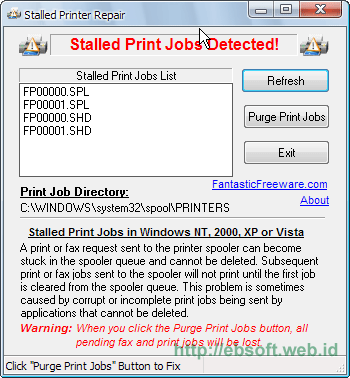
Stalled Printer Repair (346 KB). How to use very easy. After download, open the zip and then run the program. If there is a Queue on the print will be displayed as the image above. Then if you want to delete all of the queue, click Purge Print Jobs. Next we can mengulagi the process of printing. Download Zip StalledPrinterRepair.Delete "Stalled Print Jobs" manuallyIn addition to the above program, we can remove the list of queues that can not be in print (print) by manual as follows: - Open Control Panel > Administrative tools > Services
- Look for the "service" that his name Print Spooler and then right click Stopand select. Do not close first window Service
- Open the Windows system folder, usually in C:\WINDOWS\system32\spool\PRINTERS
- Delete all files in that folder. Base-files with the extension *. *. shd spl and
- After all the deleted, like step no. 2, but right-click the Print Spooler Startand select
- Repeat the process of printing a document
In addition to the two ways above, another one with batch files. Download Printer. bat (253 bytes), then run directly. This File contains commands MS-DOS (command prompt) to run the deletion queue printer such as manual steps above. Reference: - Megaleecher- fantasticfreeware  |
| Tips to easily create software Portable with Cameyo Posted: 06 Jun 2011 01:32 AM PDT Free Software  Use the software Portable is indeed easy. Portable application can we carry everywhere with pendrive and directly executed when needed. Some software may already be available in a portable version, but some others have not. Now with a free Cameyosoftware, we can create software to be portable with ease. Cameyo is a free virtualization software that is small enough to make a portable version of the application that previously had to go through the installation process. The creation of portable applications with Cameyo is very easy, we just need to do the installation software as usual and run a few steps with Cameyo. The following steps more details: - Cameyo software (1.6 MB) and Install it on your computer
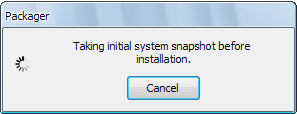
 - After the install is complete, run the Cameyoprogram, select menu Capture installation, then Cameyo will start to monitor your computer system.
 - After the process is complete, the monitor will display window "Proceed with installation" which means Cameyo is ready to monitor software that we install.
 - Start the installation of software that will be made to be Portable, including entering the serial number if the software needs it
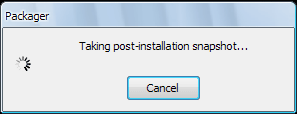
- After the software installation is complete, click the button Cameyo Install done, then Cameyo will start storing the results of the installation files.
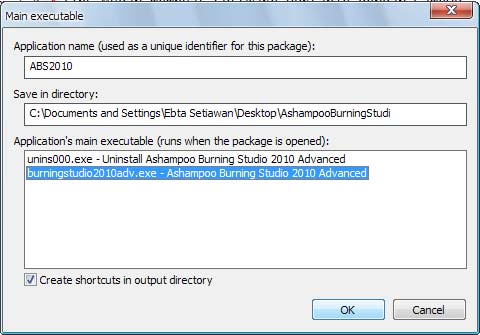
 - Once done, we can set the file to be run as portable application so, such as the following example:
 - After the click OK then the portable version creation at the start and after so we get a portable version of the exe file directly can we run without installation
Cameyo also includes the feature to edit existing so applications portable. Because sometimes there are files that are included are actually not we need, so that it can be removed to decrease the size of portable application we've created. Keep in mind that not all software installation can be made into a portable version, but it is clear with this free software, we can make a portable version with more ease. Download Cameyo (1.6 MB)  |
| Free Ebook Posted: 05 Jun 2011 11:07 PM PDT |
| Interesting Programs Posted: 05 Jun 2011 08:29 PM PDT Free Software Translate Request has too much data Parameter name: request Blokir Situs Dengan Any Weblock
01 Desember 2009
Banyak cara yang bisa dilakukan untuk memblokir akses ke sebuah situs yang tidak kita kehendaki, Salah satunya dengan menggunakan Any Weblock. Blokir Situs Dengan Any Weblock sangatlah mudah dan simple untuk dilakukan, kita hanya perlu mendownload file instalan nya lalu menginstalnya di komputer kita.
Mmm,
Kira-kira begine sob cara menggunakan nya,
Pertama, download dahulu filenya disini. setelah itu lakukan instalasi. setelah selesai, buka aplikasi tersebut.
Maka akan tampak seperti ini,
Klik add, untuk menambahkan web/situs yang ingin di blokir. Maka akan muncul seperti gambar berikut,
Kemudian, masukan alamat web/situs yang akan di blokir, dalam hal ini saya menggunkan www.facebook.com. anda bebas menentukan web/situs apa saja yang akan di blokir. Setelah itu klik Ok. dan jangan lupa untuk klik apply juga. Selesai,,
SELAMAT MENCOBA
Download Now
AddThis Social Bookmark Button
Posted in software hacker, software penting by free-download | 0 komentar
keylogger and tutorial
Sebelum saya membahas tentang Tutorial Menggunakan Keylogger, ada baiknya saya menjelaskan terlebih dahulu apa itu keylogger. Munkgkin sobat-sobat blogger ada yang belum tahu, dan bagi yang sudah tahu tentang keylogger ini, mohon koreksinya bila menemukan kesalahan di tutorial saya ini. Okeh?? Hehehe
Keyloger, apa itu keylogger?? kalau menurut saya, keylogger adalah sebuah software atau piranti lunak yang berfungsi untuk mencatat segala aktivitas yang kita lakukan di computer. Mulai dari kita menekan a-z, 0-9, kombinasi keyboard seperti ctrl+C dan lain-lain akan tercatat oleh keylogger.
Cara kerja keyloger bersifat hidden (tersembunyi). Biasanya dia akan muncul di systray jika kita melakukan kombinasi keyboard (shortcut tertentu).
Keren sekaligus menakutkan kan sob?? coba kalau keylogger di instal di warnet?? facebook orang pun dengan mudah bisa kita ambil alih.
Pesan saya, sebaiknya keylogger ini dipergunakan dengan bijak, karena perbuatan yang kita tanam hari ini kita akan memetik hasilnya di masa yang akan datang. Dan yang penting, segala perbuatan yang anda lakukan, saya tidak bertangggung jawab atas semua yang terjadi. disini saya hanya sharing aja ke sobat-sobat blogger. Anda setuju dan mengerti?? bila setuju dan mengerti silakan lanjutkan membacanya, dan bila tidak silakan cari bacaan yang lain. Hehehe
Okeh, kita lanjutkan sob.
Sebelumnya, silakan anda download
keylogger di link yang saya sediakan dibawah. Bila sudah, segera ekstrak dan lakukan instalasi. Ikuti step-step yang ada hingga proses instalasi pun selesai.
Bila sudah, tutup keylogger. Ko ditutup?? karena kita akan meng-crack keylogger agar menjadi fullversi. anda pasti suka kan?? Gratiss gitu, Hehehe
Copy-paste ctfmon.exe dan Serial.key dari folder crack ke foleder tempat anda menginstal keylogger. Secara default keylogger terinstal di C:\WINDOWS\system32\CTF.
Kemudian jalankan program.. Taraaa,, keylogger anda kini sudah menjadi fullversion.
Sekarang coba anda menuliskan sesuatu, bila sudah, coba buka keylogger nya dengan cara menclick 2x atau klik kanan lalu pilih yang view log. Maka akan tampil seperti ini,
Bagaimana sob?? keren kan?? kalau begitu, tunggu apa lagi, download aja langsung di link dibawah ini.
NB: Sebelum anda menginstal keylogger, sebaiknya matikan/disable terlebih dahulu antivirus anda, karena keylogger adalah program terlarang jadi wajar saja antivirus harus di disable. Hehehe
SELAMAT MENCOBA
Download Crack
Download Family Keylogger
AddThis Social Bookmark Button
Posted in software hacker by free-download | 0 komentar
Software Buat Memperbesar Payudara | Virtual Plastic Surgery 1.2
Waktu saya lagi nongkrong di suatu forum secara nggak sengaja saya menemukan sebuah software yang menarik perhatian saya untuk membaca nya, dan menurut saya software ini patut anda miliki, khususnya bagi kaum wanita. Software ini bernama Virtual Plastic Surgery 1.2, dengan bantuan software ini sobat blogger bisa memperbesar ukuran payudara, bokong, dan anggota tubuh yang lain dengan mudah agar tampak lebih sexy, noughty, and bitchy. Hehehe
Lihat aja sob perbedaan nya,
Terasa banget kan?? lebih big and gimana gitu.. Hehehe
Cara menggunakan software ini sangat mudah sob, beda dengan photoshop
. Didalam paket downloadnya juga sudah saya sediakan demonstrasi cara menggunakan Virtual Plastic Surgery 1.2 ini. Makin mantap aja deh belajar memanipulasi nya. Hehehe
Download Now
AddThis Social Bookmark Button
Posted in software penting by free-download | 0 komentar
Ace Translator 6.5 (41 Bahasa)
Ace Translator mempekerjakan kuasa Internet mesin terjemahan bahasa mesin, dan memungkinkan Anda untuk dengan mudah menerjemahkan isi web, surat, chatting, dan email utama antara bahasa International.
Edisi ini mendukung 41 bahasa!!! wow :)
DOWNLOAD 2MB SERVER CEPAT:
download
AddThis Social Bookmark Button
Posted in TIPS AND TRICK by free-download | 0 komentar
IP Changer 2.0 - Ubah IP Anda TANPA Reboot
ip changer
Kapan laptop pengguna bergerak ke berbagai jaringan, termasuk pengguna laptop yang khusus untuk mengubah alamat IP, alamat gateway, subnet mask, proxy server dan printer default, dll, khususnya untuk lingkungan jaringan. Untuk melakukannya, maka dia harus mengingat TCP / IP setiap konfigurasi jaringan lingkungan. Selain itu, ia harus reboot komputer untuk mendaftar ke jaringan dan konfigurasi untuk mengakses Internet.
IP Changer 2,0 telah dikembangkan untuk jelas bahwa kesulitan repot. IP Changer 2,0 memungkinkan kita, pada setiap jaringan, dengan mudah klik \x26 pilih berlaku TCP / IP konfigurasi untuk akses internet tanpa reboot.
Fitur utama:
- TCP / IP Pengaturan Ubah tanpa Reboot
- Tersedia untuk Berbagai Jaringan Lingkungan
- Dukungan Multi NIC
- Pengaturan proxy
Jika pengguna mengakses jaringan internet di lingkungan perlu mengatur proxy, dia juga harus mengatur proxy. Pengguna dapat mengatur proxy di Internet Explorer dengan IP Changer 2.0.
Catatan: Bila IP Changer 2,0 terinstal, maka perubahan alokasi alamat IP ke mode 'IP dinamis menggunakan modus' secara otomatis, tidak tergantung pada apa TCP / IP pengaturan dikonfigurasi sebelumnya. Jadi, Setelah menginstal IP Changer 2.0, Anda tidak perlu mengubah alamat IP alokasi modus ke pengaturan awal. Hal ini tidak wajib. Jika Anda mengubah mode secara sukarela, IP Changer 2,0 tidak dapat dijalankan dengan benar.
Download server mediafire 5MB:
download
AddThis Social Bookmark Button
Posted in software hacker, software penting by free-download | 0 komentar
Add On Pemantau Gempa
eQuake AlertIngin Memantau Pusat Gempa Melalui Internet? Langsung aja tanpa basa-basi pada postingan kali ini saya akan berbagi sedikit info tentang cara memantau/mengetahui dimana gempa bumi sedang terjadi. Anda tidak memerlukan sebuat alat yang canggih. Bagi anda para pengguna internet cukup memanfaatkan sebuah add on gratisan untuk browser Mozilla Firefox.
Sebuah add on bernama eQuake Alert memungkinkan para pengguna Mozilla Firefox untuk mengetahui di mana gempa sedang terjadi. Tidak hanya untuk wilayah Indonesia, eQuake juga akan memantau/menampilkan aktivitas gempa di seluruh dunia.
eQuake akan menginformasikan kepada para penggunanya jika sedang terjadi gempa, baik tanggal kejadian, lokasi maupun besarnya gempa tersebut. Uniknya, jendela browser akan bergoyang seketika saat gempa baru saja terjadi.
Untuk dapat menggunakan aplikasi ini pun cukup mudah, anda hanya perlu mendownloadnya "DISINI". Setelah didownload, restart browser Mozilla Firefox anda untuk mengaktifkan add on tersebut.
Setelah berhasil ter-install pada Firefox, informasi gempa pun akan muncul di bagian kanan bawah browser pengguna.
Demikian sekilas info yang bisa saya berikan semoga bermanfaat. Anda bisa menyebarkan info ini kepada teman-teman anda, saudara anda atau kepada siapa saja karena kita ketahui bersama Wilayah Indonesia adalah daerah rawan gempa.
AddThis Social Bookmark Button
Posted in TIPS AND TRICK by free-download | 0 komentar
Cara Mengunci Folder Dan Drive USB tanpa mengunakan software
FlashDisk saat ini merupakan benda personal yang dimiliki banyak orang. Biasanya mereka menggunakannya untuk menyimpan gambar, data pekerjaan, file penting atau lainnya. Bahkan untuk beberapa program yang Portable bisa dibuka langsung dari Flashdisk tanpa perlu repot-repot install di Komputer.
Saat ini penggunaan flashdisk sudah banyak sekali. Jika komputer anda mempunyai banyak data penting dan paling ogah jika orang lain bisa dengan sembarangan mengcopy file atau data-data penting dengan flashdisk, mengunci drive tersebut adalah ide yang tepat. Sebenarnya ada beberap tool atau software yang bisa dipergunakan untuk mengunci drive tersebut. Namun kali ini yang akan kita lakukan adalah tweak registry yang ada di komputer kita (solusi murah meriah).
Caranya :
1. Klik menu Start > Run.
2. Pada kotak dialog Run ketikkan regedit, lalu klik OK.
3. Run
4. Setelah masuk ke dalam jendela registry, cari alamat : HKEY_LOCAL_MACHINE\SYSTEM\Current ControlSet\Control\StorageDevicePolicies.
5. Jika Folder StorageDevicePolicies belum ada di dalam registry, kita bisa membuatnya dengan cara klik folder Control > Klik kanan pilih New > Key ketik StorageDevicePolicies.
6. Buat DWORD Value, caranya klik Folder StorageDevicePolicies klik kanan > New > DWORD Value beri nama WriteProtect . Kemudian dobel klik pada WriteProtect dan beri nilai 1 pada value data.
7. StorageDevicePolice
8. Restartlah komputer anda kini data-data anda lebih aman dan tidak bisa dicopy dengan sembarangan.
9. Kalau ada yang mau copas akan keluar peringatan seperti ini :
10. eror-coy
11. Untuk mengembalikannya (bisa copas) ganti pada value data pada WriteProtect menjadi 0 .
12. Beberapa cara yang lain yakni dengan menghidden atau super hidden pada folder/file yang ingin kita proteksi. Atau dengan cara memprotek hak akses pada folder/file yang kita inginkan, caranya pada jendela file explorer klik Tools > Folder Options > Properties >View hilangkan tanda centang pada menu use simple file sharing (Recomended) klik OK. Klik pada folder yang ingin kita proteksi klik kanan > Properties > Security, beri centang semua di bawah menu Deny klik OK. Ketika ada yang mengklik folder tersebut hasilnya akan keluar seperti ini :
13. fault
Catatan : Cara ini mungkin tidak berlaku untuk orang-orang yang biasa ngoprek komputer.
AddThis Social Bookmark Button
Posted in TIPS AND TRICK by free-download | 0 komentar
Mendisable TCP/IP
Nieh Cara agar IP kita ga bisa di ubah ma orang lain Cuy….Tarik mang…
- Start – Run dan ketik "gpedit.msc" – enter
- muncul "Group Policy"
- lalu masuk ke "Local Computer Policy
- User Configuration - Administrative Templates – Network – Network Connections"
- Di sebelah sebelah kanan klik 2x pilihan "Enable Windows 2000 Network Connections Setting for Administrator"
- Pada bagian tab "Setting" aktifkan pilihan 'Enable" trus klik ok buat konfirmasi
-klik 2x juga di pilihan "Prohibit Access to Properties of Components of a LAN Connections". Di bagian tab "Setting" aktifkan juga pilihan "Enable"….. klik ok buat konfirmasi.
- close
AddThis Social Bookmark Button
Posted in TIPS AND TRICK by free-download | 0 komentar
Menyembunyikan Menu Control Panel
Nah sekarang agar keamanan komptr kita lebih terjaga lagi dari tangan – tangan jahil,maka ada baiknya kita Hide menu control panel kita dimana kita harus bermain lagi di Regedit Windows,tapi Gw harap jangan di gunakan untuk mengisengin orang ye…Cos Gw kasih cara ini dengan tujuan untuk keamanan komptr kita sendiri dan orang yang membutuhkan, Ok !
Udah deh Ni caranya :
1. berarti lo harus masuk lagi ke Regedit Windowsnye
2. Dah gitu lo menuju kesini ni :
HKEY_CURRENT_USER\Software\Microsoft\Windows\CurrentVersion\Policies\Explorer
3. Nah seperti biasa lo klik kanan di tempat yang kosong New – DWORD value
4. ganti namanya menjadi NoControlPanel
5. lalu lo klik dua kali deh di nama entu dan ubah angkanya menjadi 0 atau 1
NB: ( 0 = disable/munculin dan 1 = enable/di Hide tu controlpanelnya)
AddThis Social Bookmark Button
Posted in TIPS AND TRICK by free-download | 0 komentar
Agar tidak bisa klik kanan di desktop
Agar kita tidak bisa klik kanan di dekstop kompter dan pada Windows Explorer
Bila kita mempunyai tujuan untuk keamanan komputer kita yaitu agar orang lain ga bisa klik kanan pada dekstop kita dan pada windows explorer yang ada pada komputer kita, kita cukup mengoprek regedit kita ajah di :
1.Masuk ke regedit (dari menu Run)
2. lalu menuju ke HKEY_CURRENT_USER\Software\Microsoft\Windows\CurrentVersion\Policies\Explorer
3. nah lalu lo klik kanan ajah di tempat yang kosong – New – DWORD Value – dan ubah namanya menjadi "NoViewContextMenu"
4. Isi kan dengan angka 0 atau 1 (0 = Disable dan 1 = untuk enable/sembunyiin)
5. restart deh agar kita tau perubahannya
Semoga membantu
AddThis Social Bookmark Button
Posted in TIPS AND TRICK by free-download | 0 komentar
Mendisable System Properties My Computer
di Windows Peran My computer itu cukup penting juga untuk mengetahui Pentium berapa, Memori berapa, kita bisa merubah computer name dan workgroup LAN, bahkan kita pun bisa menguninstal Driver – Driver motherboard, jadi intinya cukup Penting dalam sistem Windows dan cukup berbahaya jika tidak di amankan, karena hampir semua Pengguna komputer tau bagaimana cara menggunakan sistem properties My Computer, Nah ini dia gw mo sharing ma kalian tentang bagaimana mengamankan sistem properties dengan cara mendisablenya yaitu dengan cara :
1. masuk Run – ketik regedit
2. Lalu ke HKEY_CURRENT_USER\Software\Microsoft\Windows\CurrentVersion\Policies\Explorer
3. dan di tempat yg kosong klik kanan –> New –> DWORD Value
4. dan ketik NoPropertiesMyComputer –> dan klik 2 kali di tulisan tsb dan isikan angka 0 atau 1.
5. dengan ket : 0 untuk enable dan 1 untuk disable
semoga bermanfaat dan selama mencoba
AddThis Social Bookmark Button
Posted in TIPS AND TRICK by free-download | 0 komentar
cara kirim pesan tanpa program melalui dos melalui lan
Mau chating/kirim Pesan ke sesama Teman mu di jaringan ? Tanpa Internet, yahoo messenger atau msn masanger, Mau..MAu..Mau? cara nya ga sulit ko, kalian hanya mempunyai syarat 2 yaitu adanya Jaringan internal dan tentanya PC dong hahahaha…udah AKh..biar ga banya basa basi lg berikut gw sharingkan Ilmunya:
Pertama – taman kita harus Mengaktifkan service messenger dengan urutan caranya sbb:
1. Masuk di Start – All Program – Run, ketik services.msc.
2. Cari yang bernama Messenger, double klik.
3. Pada Messenger Properties, masuk tab General lalu atur Startup type: dalam posisi Manual dan Service Status: dalam keadaan Started dengan mengklik tombol Start. Bila ingin mengaktifkan service Messenger secara otomatis pada saat komputer dihidupkan set Startup type: dalam posisi Automatic.
lakukan hal yg sama pada tiap2 komputer agar bisa terhubung.
cara mengirim pesan:
Masuk di Start – All Program – Accessories – Command Prompt lalu ketikan perintah net send
misal : net send 10.2.3.28 cinta dan enter
AddThis Social Bookmark Button
Posted in TIPS AND TRICK by free-download | 0 komentar
Download di rapidshare Tanpa waktu Tunggu
28 November 2009
Rapidshare.com merupakan salah satu free file hosting raksasa yang ada di internet saat ini, disana terdapat jutaan file yang telah di host untuk bisa di download. Untuk download file yang ada dirapidshare ada dua pilihan yaitu free user serta premium user Bagi anda yang sedikit berkantong tipis atau tidak terlalu banyak aktivitas download lebih baik memilih free user, namun jika anda sering melakukan aktivitas download file di rapidshare mungkin memiliki premium user boleh menjadi pilihan anda.
Perbedaan mencolok antara free user dengan premium user salah satunya adalah untuk free user ada pembatasan besarnya file yang didownload setiap hari, kecepatan download, serta waktu delay atau waktu tunggu agar bisa melakukan download suatu file sehingga anda harus meluangkan banyak waktu dan mempunyai kesabaran yang tinggi.
download rapidshare
Untuk free user, normalnya apabila anda ingin download suatu file anda diharuskan menunggu terlebih dahulu sesuai dengan waktu yang rapidshare tentukan. Namun itu adalah apabila dalam kondisi normal, sebenarnya banyak sekali cara agar free user bisa seperti premium user diantaranya yaitu dengan memakai tool, mozilla add-on ataupun userscript bagi anda pengguna browser mozilla firefox.
Rapidshare AutoWait Userscript.
Jika anda pengguna browser Firefox, anda bisa mencoba berbagai userscript yang bisa menghilangkan waktu tunggu saat download di rapidshare, salah satu userscript yang telah kang Rohman coba dan ternyata berfungsi dengan baik adalah Rapidshare AutoWait .
Untuk menginstal sebuah userscript, terlebih dahulu harus terinstall add-on greasemonkey di firefox anda, jika belum install greasmonkey silahkan anda install dulu.
greasemonkey
Apabila greasemonkey sudah terinstall pada firefox anda, sekarang anda tinggal menginstall userscript Rapidshare AutoWait.
rapidshare autowait
Untuk menguji fungsi userscript Rapidshare AutoWait, silahkan download file berikut :
http://rapidshare.com/files/304856684/Magazine_R_1.5.rar.html
SkipScreen
Ini adalah firefox add-on favorit kang Rohman karena skipscreen tidak hanya untuk rapidshare namun berlaku juga untuk file hosting yang lainnya seperti megaupload, mediafire, 4shared, uploaded, hotfile dan lain-lain. Anda dapat melakukan setting pada menu option.
skipscreen preferences
Yang mau mencoba kehandalan add-on Skipscreen, silahkan install pada firefox anda.
install skipscreen
Rapidshare Mass Downloader
Untuk yang lebih suka memakai tool, Rapidshare Mass Downloader mungkin bisa menjadi pilihan.
rapidshare mass downloader
Yang mau mencoba, silahkan download.
Download Rapidshare Mass Downloader
Selain cara diatas tentunya masih banyak cara lain yang bisa anda lakukan.
Walaupun demikian cara diatas sewaktu-waktu menjadi tidak berlaku karena pihak rapidshare akan selalu mencari cara untuk menghindarinya, akan tetapi walaupun begitu tetap saja ada cara untuk mengelabuinya.
AddThis Social Bookmark Button
by free-download | 0 komentar
PhotoScape v3.3
01 Juli 2009
Pernah dengar software yang satu ini gak? Kalau Photoshop pasti sudah sering mendengarnya bahkan pun sudah bosan ya? Mari kita bahas software editing yang satu ini. Photoscape adalah freeware alias software gratisan yang digunakan untun mengedit-edit gambar dengan mudah dan simple. Yang saya suka adalah frame-frame yang telah disediakan agar dapat lebih mudah dalam mengedit foto. Bukankah foto anda tidak terasa lengkap tanpa editan-editan yang memukau...?
Image Source,Photobucket Uploader Firefox Extension
Ini adalah keunggulan dari Photoscape :
* Viewer: Dapat menampilkan foto" yang ada di komputer anda,slideshow juga...
* Editor: mengganti ukuran, pencahayaan and pengaturan warna, keseimbangan foto, koreksi efek, frames(bingkai), balloons, mosaic mode, menambah teks dengan mudah, drawing pictures, cropping(mengambil bagian terpenting), filters, red eye removal, blooming
* Batch editor: Mengumpulkan beberapa foto menjadi satu
* Page: Membuat 1 foto dengan foto" lainnya dengan frame yang telah tersedia
* Combine: Menggabungkan foto yang tersusun secara vertikal maupun horizontal
* Animated GIF: Membuat animasi GIF dengan mudah
* Print: Dapat langsung print hasil editan
* Splitter: Membagi/memotong 1 foto menjadi beberapa foto
* Screen Capture: Dapat menggunakan screenshot dan menyimpannya langsung
* Color Picker: Dapat mengambil warna yang disukai dari suatu foto
* Rename: Dapat mengganti nama foto
* Raw Converter: Mengubah file RAW menjadi JPG
photoscape2
>>>Download file (14MB)<<<> Cara pertama
loe bisa pk command prompt, START - RUN - ketikkan "cmd".
Pada prompt, ketikkan :
shutdown.exe -i
Nanti akan muncul Remote Shutdown Dialog, silakan browse aja komputer yg ingin Anda shutdown...
-
Cara kedua :
Perintah laen di command prompt, seperti ini :
shutdown [{-l|-s|-r|-a}] [-f] [-m [\ComputerName]] [-t xx] [-c "message"] [-d[u][p]:xx:yy]
Keterangan parameter
-l = Logs off the current user, this is also the defualt. -m ComputerName takes precedence.
-s = Shuts down the local computer.
-r = Reboots after shutdown.
-a = Aborts shutdown. Ignores other parameters, except -l and ComputerName. You can only use -a during the time-out period.
-f = Forces running applications to close.
-m [\ComputerName] = Nama komputer yang akan anda shut down.
-t xx = memberikan waktu hitung mundur waktu untuk sistem shudownd dalam xx detik. Defaultnya adalah : 20 detik
-c "message" = Specifies a message to be displayed in the Message area of the System Shutdown window. You can use a maximum of 127 characters. You must enclose the message in quotation marks.
-d [u][p]:xx:yy = Lists the reason code for the shutdown. The following table lists the different values. Value Description
u = Indicates a user code.
p = Indicates a planned shutdown code.
xx = Specifies the major reason code (0-255).
yy = Specifies the minor reason code (0-65536).
/? -= Displays help at the command prompt.
NB : Kalo misal perintah command prompt tsb tdk jalan, lakukan setting di komputer target dgn memperbolehkan akses Remote Computer. Caranya : klik kanan My computer (komputer target), liat ke tab Remote, dan centang bagian "Allow users to connect remotely to this Computer". Jgn lupa firewall diset utk membolehkan akses secara Remote.
Sebagai contoh yang gw lakukan adalah melakukan shutdown pada komputer CLIENT-05 dengan parameter (1) mati dalam waktu 60 detik, (2)mematikan paksa semua aplikasi, (3) restart komputer setelah shutdown, (4) Indikasi nama komputer, yang dimatikan ,log major reason code 125, and log minor reason code 1, saya harus mengetik di command promt sebagai berikut :
shutdown -r -f -m \CLIENT-05 -t 60 -d up:125:1
AddThis Social Bookmark Button
Posted in TIPS AND TRICK by free-download | 0 komentar
Windows Admin Hack
26 Juni 2009
Komputer anda ga bisa di buka karena passwordnya lupa?? atau ga tahu passwordnya admin??
Hueh,
Instal ulang?? ngapain??
Instal ulang bukan solusi buat masalah satu ini, yang anda perlukan hanya sebuah tools kecil yang dapat mereset password tersebut. sebut aja windows admin hack. Dengan bantuan tools ini kita bisa mereset atau menghapus password. penggunaanya pun cukup mudah, pertama download aplikasinya yang berbentuk file .iso, kemudian burning di CD atau bisa ke flash disk. Aplikasi ini mendukung Win Xp dan 2000.
Simple kan???
Hehehehe
Tertarik??
Langsung aja di download di link yang saya sediakan dibawah ini.
DOWNLOAD  |
| How to lock the cells in Excel Posted: 05 Jun 2011 05:57 PM PDT Free Software Lock cells in the Excel handy to secure the data contained in the cells it so other people can not be changed. Stages are as follows: - Remove locked all cells (if this is not done, all cells will be locked) > select all sheet (ctrl + a) > right click > format cells > protection > contreng locked eliminated
- Lock cell. Select the cells that will be locked > right click > format cells > protection > make sure the tabs locked tercontreng > ok
- Enter the passwor. Go to the tab > protect sheet review > make sure the select locked cells are not tercontreng > enter password > ok
 |
| Firefox 3.5.2 Posted: 05 Jun 2011 04:56 PM PDT Free Software - Browser Firefox 3.5.2, new features, faster, there is private browsing, it looks more okay. The latest feature is the a private browsing. Browsing the we can with this without leaving a trace options, such as cookies, history, cache and others. Well this online , if not to the same computer that had discovered, using only private browsing . Other new features is the super speed. It means browser is far away from faster than previous versions and memory also use a little more. Less it means not much more than the previous version. More minimal memory use his computer. Download herecourse.  |
| FlexiNet Unlimited Posted: 05 Jun 2011 02:23 PM PDT Free Software Internet unlimited alias internet without limit of Telkom Flexi. The latest data services are very cheap. Just two thousand five hundred dollars per day, directly deducted from pulse number flexi used. Overview review -Less like this: FlexiNet Unlimited Internet Rp 2,500,-/day FlexiNet Unlimited Internet Rp 15,000,-/week -How to register is easy: Type reg daily sms to 2255, for subscriptions per day Type reg weekly sms to 2255, for subscriptions per week -Sms reply/answer number 2255 don't have to wait long. Registration of the daily, the contents like this: "FlexiNet Unlimited Daily has been active, the user name: xxxxxxxxxxx @ free, password: telkom, dial Up to the # 777. The rate of Rp 2,500 per 24 hours. " Then there are the following: sms "FlexiNet Unlimited Daily You will be extended automatically every 24 hours. To stop type STOP sms to 2255. " Furthermore there are sms greeting enjoy unlimited internet service. After that test FlexiNet Unlimited. Dialnya sometimes it is hard to get. Usahankan signal stable and good, more easily connected. Every now and then try to check the pulse * 99 # to see the stability of the signal. Internet connection is not too fast, but okay for just surfing. And there is a certain time (morning) quite fast internet connection, to download tens of megabytes. May be useful. Thanks for Telkom Flexi already pioneered internet cheap without limit. Forward internet Indonesia!  |
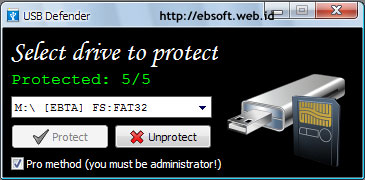
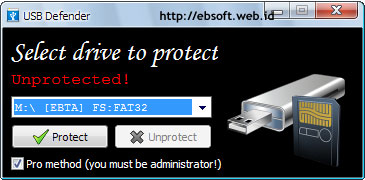
| Stop the spread of Autorun Virus with USB Defender Posted: 05 Jun 2011 12:47 PM PDT Free Software  Although the spread of the virus through Autorun Windows techniques have started to decline, but this vulnerability we can not ignore it. Some viruses are still using the Autorun.inf in USB Pendrive as a trigger for easy spread across various computers. If ever I've discussed about Panda USB Vaccine, now there is another alternative, i.e. USB Defender. Vaccination USB technique is actually already more than a year used by a variety of software security. Including local like Smadav antivirus also use this technique. This technique by creating a file or folder with the name Autorun.inf on protection so that can not be deleted, rename or modified. In this way, the virus that will make the file autorun.inf will not be able to and spread to other computers can be on the decrease.  Keep in mind that vaccinations like this only prevents the spread through autorun.INF only and will not prevent USB Pendrive exposed to the virus. So can remain exposed to the virus Flashdisk, it's just not going to spread to other computers automatically. USB DefenderUSB Defender on develop with such techniques, which will create a Autorun.inf Folder in protection with 5 levels. Its use is very easy, we just choose drives that will be on protection, and then click Protect. In order for protection using 5 levels, menu Pro method must be enabled (checked). And to do this, the computer user must have administrator permissions. Engineering protection using USB defender is indeed quite powerful. As with any Panda USB Vaccine, this protection techniques could not be removed with software Unlocker (protection SmadAv can still be deleted with Unlocker). But if "Pro Method" is not selected, only 4 levels proteksinya (4/5) and Autorun.inf can still be deleted with Unlocker. Therefore, make sure the pro method chosen when your USB Pendrive.  If we ever had on the Flashdisk protection with Panda USB Vaccine, protection remains we can replace with protection from USB Defender. In addition to being portable (no need to install), USB Defender also supports all windows file systems (FAT or NTFS). According to the maker, USB Defender is also more powerful than the Panda USB Security and USB Threat Defender. Download USB Defender (~ 350 KB)  |
| Windows Server 2003 R2 Enterprise Edition with SP2 Posted: 05 Jun 2011 12:02 PM PDT Free Software - Windows Server 2003 R2, an update of Windows Server 2003, was released to manufacturing on 6 December 2005. It is distributed on two CDs, with one CD being the Windows Server 2003 SP1 CD. The other CD adds many optionally installable features for Windows Server 2003. The R2 update was released for all x86 and x64 versions. Windows Server 2003 R2 Enterprise Edition was not released for Itanium. New features:- Branch Office Server Management
- Identity and Access Management
- Extranet Single Sign-On and identity federation
- Centralized administration of extranet application access
- Automated disabling of extranet access based on Active Directory account information
- User access logging
- Cross-platform web Single Sign-On and password synchronization using Network Information Service (NIS)
- Storage Management
- File Server Resource Manager (storage utilization reporting)
- Enhanced quota management
- File screening limits files types allowed
- Storage Manager for Storage Area Networks (SAN) (storage array configuration)
- Server Virtualization
- A new licensing policy allows up to 4 virtual instances on Enterprise Edition and Unlimited on Datacenter Edition
- Utilities and SDK for UNIX-Based Applications add-on, giving a relatively full Unix development environment.
- Base Utilities
- SVR-5 Utilities
- Base SDK
- GNU SDK
- GNU Utilities
- Perl 5
- Visual Studio Debugger Add-in
Link Mediafire Part 7Password [ 1234ok] PerhatianJika anda tidak ingin mendownload bisa langsung membeli kepada saya dengan harga Rp.15.000
Fds7 |
| Support for Windows XP SP2 expires soon Posted: 05 Jun 2011 11:12 AM PDT Free Software  For those of you who use Windows XP Home/Professional Service Pack 2 (SP2) may have to prepare yourself to install SP3. Maybe some already know, that was not soon, Microsoft will end support (support) for Windows XP SP2. Specifically, support will be ended on , July 13, 2010. Previously, Service Pack 1 and 1a are over 10 October 2006. What exactly is the Service Pack and what its effect if support or support for windows this is over? What Is A Service Pack?Service Pack is a collection or a collection of updates, improvements or additional features for a software/program distribution in the form of a package installation. Because it is a collection of various fixes, usually quite large in size. Windows XP (32 bit), until it's been up to the stage of Service Pack 3 (SP3), the previously existing SP1 and SP2. Most contain a security vulnerability fixes appear or program errors, although for SP2 included also a variety of additional features to Windows XP.  For Windows XP SP1, microsoft has already ended his support since October 10, 2006, and soon Windows XP SP2 also will end. According to Microsoft, Windows XP SP2 will end up on , July 13, 2010. As for SP3 still in support until April 8, 2014. What is the impact if a Service Pack Ended?If we use the Windows XP SP2 and the support (support) is over, then we will no longer receive updates or patches from Microsoft. Or in other words, Microsoft does not provide updates and fixes again, after that date, although Windows can still be used as usual. But with no support (support), could be quite fatal to our computer security, especially when the computer is connected to the Internet. As the operating system that is most used, windows XP much be a target (the attack). The longer, the more dangerous security gap is discovered, so it can be fatal in areas such as computer controlled from somewhere else, easily susceptible to viruses, worms, Trojans and more. With the Service Pack, this security vulnerability is usually overcome or at least the danger that could inflict more reduced. What's The Solution?If you're still using Windows XP, then the alternative is soon to install Service Pack 3, because the services are still continue until 2014. If a computer only used at home and not used for online (internet connection), then the installation of SP3 not urgent needs. If we want to install SP3, windows at least must have installed SP1.  Download Service Pack 3 can be directly obtained from the Microsoft website ( download SP3) or from other address softpedialike. Its size is quite large, about 316 MB. Before SP3 also provided some local computer magazine. Source: Windows XP  |
| BeritaJitu.com A SEO contest with prizes 27.5 Million Rupiah Posted: 05 Jun 2011 09:02 AM PDT Free Software - Background Some time ago, the people of Indonesia known as Nations that love peace, tolerance, tepo seliro, friendly and many other positive things that characterizes the nation Indonesia. But now some kid nation began to lose his characteristics as a nation of Indonesia. It can be seen from the State of the community around us today. No matter on others, there is no tolerance even foreign and strange with a difference. When the nation was built with the "bhinneka" 's. So much of society Indonesia losing identity as a nation of Indonesia. And it gets worse, the situation continued to deteriorate. No major changes can be made only in 1 night. The process of RESHAPING the IDENTITY requires a process. Therefore, this contest invites the brothers se homeland, to launch small things, namely mutual reminding fellow for IDENTITY RESTORING the NATION that we start from ourselves and our environment. And because of that, too, with the momentum of the anniversary of the independence of the nation and the inauguration of the President of the period 2009-2014, BeritaJitu.com want to promote the campaign to "IDENTITY RESTORING the NATION" and pass it to all corners of the internet through SEO CONTEST. For details please see the Beritajitu.com SEO Contest and example posting with the theme of identity restoring the nation.  |
| Turn Photos into Sketches Posted: 05 Jun 2011 06:58 AM PDT Free Software This photoshop Tutorial about "How do I change the photos into sketch color pencil." Color images in black and white sketches are matched with the originals. Turn photos into sketches certainly is interesting because it has a art its value. More interesting again if the results are in-print and figure is given (the frame). The measures make it are as follows: - Open the photoshopnya. After that, find the image that will be made a sketch of pencil. :
- After the first figure represented, the next step: mouse you Navigate on the "Layer image" in this Backgroundthing, then right click and select "Duplicated Layer".
- After duplicated image making, click Ctrl + Shift + U, then the image will change to a picture in black and white.
- After the image is transformed into black and white, the next step is layer : make duplicate again, as above, and then click Ctrl + I, then the image will be transformed into the image of the film.
- After the third image tertampilan. For the next IE: mouse On "Filter > Blur > Gaussian Blur" then it will go out the window pop_up Gaussian blur, then on "Pixel" give the value of the Radius of the "3.3" and then click Ok.
On the fourth image if the image appears to be noticed, is not clear or too faded. But from the picture that makes the image more clearly after the transfer of the color. Therefore, for the final step: - On the fourth picture, point the mouse on the represented "Set The Blending Mode For The Layer". Then change the name of theNormal"of" being "Color Dodge". After you change the Mode "Normal" to "Color Dodge" then, the image directly will transform into the color pencil sketch. And look like scratches Pencil
 |
| Casually can Pulse Posted: 05 Jun 2011 04:33 AM PDT Free Software Agent ID: AA6014Originally accidentally  finds a bannerbonuspulsa on a website. When I read and studied it quite interesting. The capital is not too large only 69 ribu rupiah, it can become a member. Before registering my interview , first Ysponsorship through ahoo Messenger. Ask me this and that, finally signed up with consideration of cheap and sistimnya did not elaborate. Because MLM system already know before, I assess bonuspulsa the system easy to learn and transparent. The rest I don't expect too much because originally casually. Fortunately the sponsorship well liver gives ration one downline to the development of the network. In the end my downline network pretty much developed, so I sprayed bonus credits every time, because the bonus transaction could taken anytime with a specific sms format. Though if the dihitung-hitung bonus credits every month not too besarl, suffice it to mobile toll usage and don't need to shell out more to buy credits. I am not active promotion online, just banner and put a link web replica in blog to learn the computer . Network with members reaching the dozens of people are already adequate for a promotion referrals hook not passion. To extend the network, of course the required active promotion through various online media such as blogs, mailing lists, facebook or other social sites, advertise in a variety of web advertising and so on. Offline promotion could also be done when it is needed. Of recent developments, there is a new news bonuspulsa site that began in September will be added to the depth level 15network becomes. Current depth level network reach 10 level. With the addition of this level will certainly add to our chance to expand the network and of course we will gain bonus credits. In addition to bonus credits, members are also given the opportunity reward Gets a wide variety of gifts tailored to specific conditions. Almost every month there reward promo we can win. The most important of any MLM business is hard work for us to expand the network of referrals. Do not first dreamed of pompous about MLM business. Bonuspulsa not money game, not the business how to quickly so rich in an instant, not how to quickly get the money for millions of dollars per day in minutes or hours. So, if want to expand your network in bonuspulsasuccess. And it needs to promotion, promotion and promotion.  |










0 komentar:
Posting Komentar